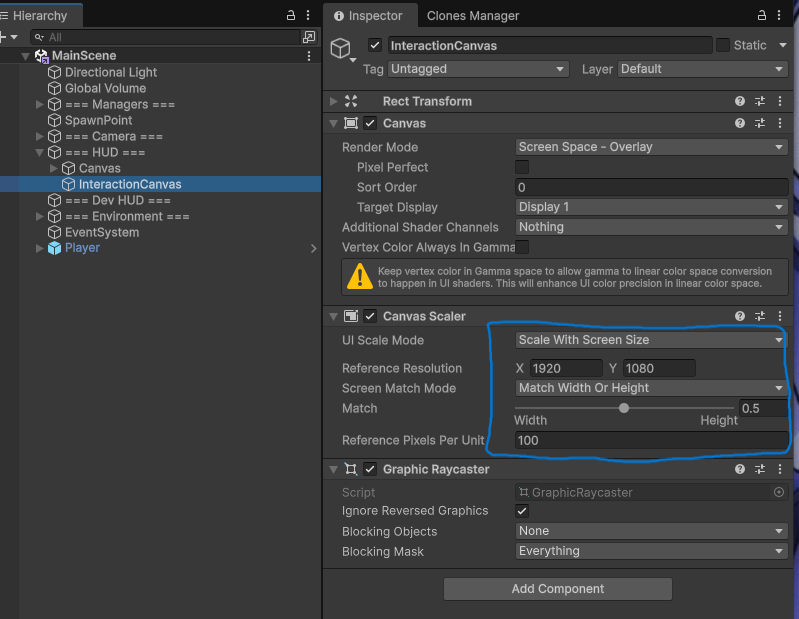
I forget to set scalable Canvas settings.
These settings would fit the need for most cases for 1080p environment.
1. Scale With Screen Size
2. 1920 x 1080 (1080p)
3. Match Width Or Height
4. Threshold to 0.5
Random notes
I forget to set scalable Canvas settings.
These settings would fit the need for most cases for 1080p environment.
1. Scale With Screen Size
2. 1920 x 1080 (1080p)
3. Match Width Or Height
4. Threshold to 0.5
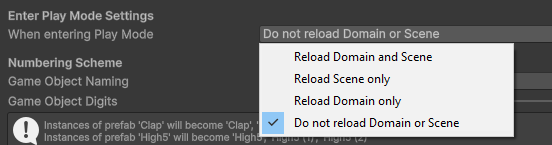
Feeling frustrated when hitting Play to test your game?
1. Edit -> Project Settings
2. Editor on the left side
3. Change the settings for “When entering Play Mode” to Do not reload Domain or Scene.
*Understand when you should be reloading by reading the Unity documentation.
Getting TextMeshPro to always face the camera rotation.
For some reason, the text was upside down. Added a flip in code.
using UnityEngine;

public class TextMeshFloater : MonoBehaviour
{
    private Camera mainCamera;

    void Start()
    {
        mainCamera = Camera.main;
    }

    void Update()
    {
        if (mainCamera != null)
        {
            // Make the text face the camera
            transform.LookAt(mainCamera.transform.position);
            // Flip because Text is upside down
            transform.Rotate(180, 0, 0);
        }
    }
}